
I love my Kindle. I also kind of hate what it does to my memory.
Not because reading digitally is bad. It’s just… when I finish a Kindle book, the story can blur faster. Like I woke up from a dream and I’m trying to grab at it, but it’s slipping through my hands. I remember I liked it. I remember a few scenes. Maybe one quote. Then life happens.
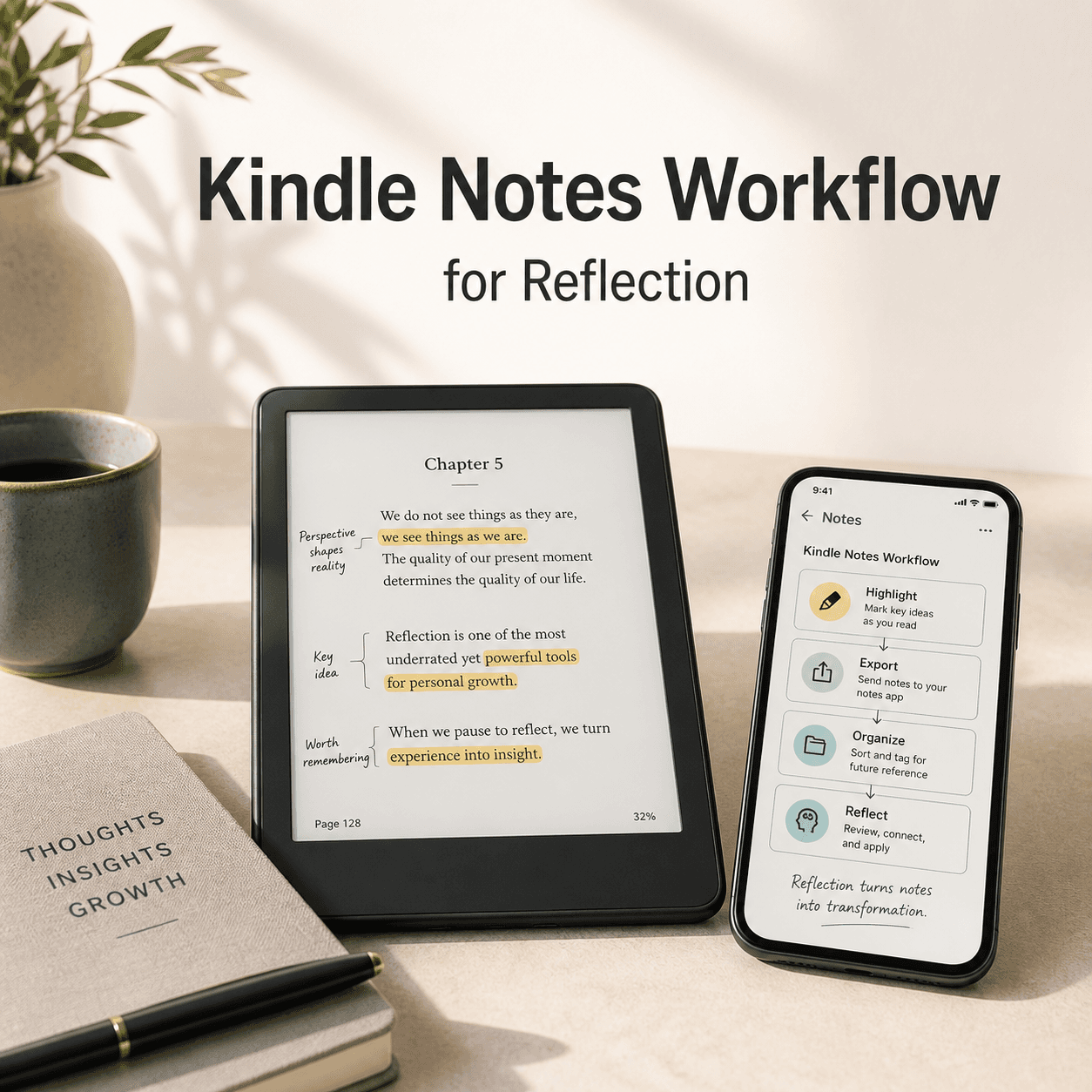
So this is my attempt to fix that. Not with a complicated system that makes reading feel like homework. More like a gentle workflow. Something you can do while reading, and then a little bit after, so you actually keep what mattered.
This is the best Kindle note-taking workflow I’ve found for reflection. It’s simple, it’s flexible, and it works even if you’re the kind of reader who highlights way too much. (Hi. It’s me.)
Along the way, I’ll point you to a few places on GlimmerReads where you can turn those notes into something more like a life practice, not just a pile of highlights.
The goal (so we don’t overcomplicate this)
Let’s define what we’re doing.
Reflection notes are not the same as:
- Studying notes (for school, exams, research)
- Book review notes (plot recap, star rating, “pros and cons”)
- Quote collecting (pretty lines with no context)
Reflection notes are for the part of reading that changes you. Even in small ways.
The goal is to finish a book and still be able to answer:
- What did this story make me notice about myself?
- What do I want to remember a week from now?
- What do I want to try, question, or carry forward?
That’s it.
The 3 layer workflow (Highlight, Note, Reflect)
This workflow has three layers:
- Highlights: quick captures while reading
- Notes: tiny tags so your future self understands why you highlighted
- Reflection: a short “after” ritual that turns notes into meaning
If you do only layer one, you’ll still get value. If you do all three, you’ll actually remember the book.
What to set up first (5 minutes, once)
Before you start, do a quick setup so Kindle doesn’t fight you.
1) Decide where your notes will “live”
You have three good options:
- A single reflection notebook (paper)
- A notes app (Apple Notes, Notion, Obsidian, Google Docs)
- A printable template you reuse (simple and satisfying)
My personal preference is a digital “Book Reflection Vault” plus a paper journal for the final reflection. Digital for storage. Paper for the part where I actually feel something.
2) Turn on Kindle syncing
Make sure Whispersync is on so your highlights/notes show up across devices and in the Kindle notebook.
- Kindle device/app settings: Sync notes and highlights
- Same Amazon account everywhere
3) Bookmark your highlights page
Amazon stores all your highlights here:
https://read.amazon.com/notebook
You’ll use it later.
4) Create one “inbox” note
In your notes app, make one note called:
Book Notes Inbox
This is where you paste highlights temporarily. Do not organize yet. Just collect.
(Organizing too early is how people quit.)
While reading: The Kindle highlight rule that changes everything
Here’s the rule I follow:
Highlight less. But when you do highlight, add a 5 second note.
Yes, Kindle notes are slightly annoying to type. But a tiny note is what makes a highlight useful later.
Without a note, you’ll revisit highlights and think:
“Why did I underline this again?”
With a note, you’ll see:
“Oh. This is the part where she realized she keeps leaving before she can be left.”
That’s reflection gold.
The “3 types of highlights” system (so you don’t highlight everything)
When I’m reading for reflection, I only highlight these three categories:
Type 1: Mirror highlights (This is me)
Something that reflects your own patterns, fears, habits, relationships, values.
Kindle note tag: MIRROR
Example:
A character people pleases, avoids conflict, overworks, shuts down, self abandons, whatever. And it hits a nerve.
Type 2: Lantern highlights (This shows me something)
A concept, truth, question, insight, or line that illuminates something.
Kindle note tag: LANTERN
This can be fiction or nonfiction. Fiction is full of lanterns, honestly. A good novel will show you what you’ve been avoiding.
Type 3: Tool highlights (I can use this)
A practical idea you might apply: a boundary script, a routine, a mindset reframe, a journaling prompt, a coping tool.
Kindle note tag: TOOL
If it’s nonfiction, you’ll find lots of these. If it’s fiction, it’s often social or emotional tools.
This simple triage keeps your highlights meaningful. Not perfect. But meaningful.
How to write Kindle notes quickly (without losing your reading flow)
Kindle notes don’t need to be pretty. They need to be readable later.
Here are a few formats that work well:
Option A: One line reaction
- “This is the exact way I talk myself out of rest.”
- “I do this in friendships.”
- “This felt like permission.”
Option B: Tiny context + feeling
- “She’s leaving before being left. Felt sad and familiar.”
Option C: A question
- “Where do I do this?”
- “What would it look like to choose differently?”
Option D: A tag + 3 words
If you’re really in the zone, do:
MIRROR: fear of being too much
LANTERN: grief is nonlinear
TOOL: name the need
That’s enough. Really.
Suggested image: Kindle highlight + note example
(If you’re adding your own screenshots, this is a great spot for a real Kindle screenshot of a highlight with a short note.)
The “bookmark trick” for big moments
Sometimes you hit a part that’s bigger than a highlight. A turning point. A scene that makes your stomach drop. A paragraph you know you’ll want to revisit.
Do this:
- Add a Bookmark in Kindle
- Write a note on the most important line nearby with:
BOOKMARK MOMENT
Later, when you’re reflecting, you’ll go straight to those emotional peaks.
This is especially helpful for novels, memoirs, and anything character driven.
After reading: The 15 minute reflection export (the part that makes it stick)
This is where most people stop. They finish the book, feel full, and move on.
But reflection needs a tiny bridge. So here’s what you do after you finish.
Set a timer for 15 minutes. That’s it.
Step 1: Open your Kindle notebook (Amazon)
Go to:
https://read.amazon.com/notebook
Pick the book. You’ll see all your highlights and notes.
Step 2: Copy everything into your “Book Notes Inbox”
Don’t sort. Don’t edit. Just paste.
Yes, it will look messy. That’s fine.
Step 3: Skim and pick your “Top 10”
Now skim the pasted content and pull out your top highlights. Not the best writing. The most meaningful.
Create a small section called:
Top 10 Highlights
Copy only those into it.
If you have fewer than 10, great. If you have 40, choose 10 anyway. This is the muscle we’re building. Choosing.
Step 4: Write the 6 sentence reflection
This is the core of the workflow. The part that changes your relationship with the book.
Write these six sentences. Literally. Keep it short.
- This book was about… (one sentence)
- The part that stayed in my body was… (a scene, idea, feeling)
- It reminded me that I… (pattern, truth, grief, desire)
- It challenged me to… (question or change)
- I want to remember… (one line)
- One small thing I’ll try is… (specific and doable)
That’s a full reflection. In under 10 minutes.
Step 5: Choose one “carry with me” quote
Pick a single quote. Not five. One.
Label it:
Pocket Quote
This becomes the quote you can revisit later when life is loud.
Suggested image: Simple reflection template
(On GlimmerReads, this is also where a printable could live. If you have one, link it here.)
The weekly rhythm (so your notes don’t pile up forever)
If you read a lot, exporting after every book can still turn into a backlog.
So instead, you can do a weekly rhythm.
Once a week, 30 minutes:
- Export highlights for whatever you finished
- Write the 6 sentence reflection for each
- Pick one Pocket Quote for the week
If you subscribe to The Weekly Chapter on GlimmerReads, this pairs beautifully with the monthly themes. You can align your “One small thing I’ll try” with whatever theme you’re exploring that month. It’s cozy accountability, basically.
How I organize my notes long term (simple, not obsessive)
Once you have reflections, you need a home for them.
Here’s a structure that stays manageable.
Folder: Book Reflections
Each book gets one page/note with:
- Title + author
- Date finished
- Genre or vibe (optional)
- Top 10 Highlights
- 6 sentence reflection
- Pocket Quote
- Tags
Tags I actually use
I keep tags very human, very broad:
grieffriendshipburnoutidentitymotherhoodhealinganxietycouragelovestarting over
If a book doesn’t fit a tag, I don’t force it. Some books are just seasons.
Fiction reflection (because it’s different, and it matters)
A lot of note-taking advice is built for nonfiction. But fiction is where reflection gets sneaky. The insights come sideways.
So for novels, I add two extra prompts:
1) “Who did I become while reading this?”
Not who was my favorite character. More like… what did the book pull out of me?
Softer me. Braver me. Lonelier me. More honest me.
2) “What did I keep noticing?”
This is the repeated theme your mind grabbed.
Abandonment. Home. Power. Small kindness. The cost of silence. The relief of telling the truth.
When you write that down, you start seeing your own inner themes across different books. Which is wild. And helpful.
If you want more prompts like that, the Reading Room on GlimmerReads is built around this exact vibe. Reading as a way to notice what’s happening inside you, not just outside you.
The “too many highlights” problem (and the fix)
If you highlight constantly, you’re not alone. Kindle makes it easy and satisfying.
But too many highlights can make reflection feel impossible. So here’s the fix:
Do a “Second Pass Select”
During your export step, do not try to clean everything.
Just create:
- Top 10
- Honorable mentions (optional)
Everything else stays in the archive.
And if you’re truly drowning in highlights, try this rule for your next book:
The 5 highlights per chapter rule
You can highlight anything you want, but only 5 per chapter get to stay.
It forces you to choose. It also makes you read differently. Slower. More present.
What if you don’t want to type on Kindle at all?
Fair. Sometimes I’m reading in bed and I do not want to poke at a tiny keyboard like it’s 2009.
Here are alternatives:
Option 1: Highlight only, then annotate later
When you export, add your MIRROR/LANTERN/TOOL tags in your notes app instead of on Kindle.
Option 2: Use voice notes after a reading session
After you stop reading, record a 30 second voice note:
- “The thing that hit me was…”
- “I think this connects to…”
- “I want to remember…”
Then later, paste a quick summary into your book note.
Option 3: Use Goodreads or StoryGraph as a bridge
Write a short reflective review there, then copy it into your reflection archive.
Not perfect, but it works.
The actual workflow, start to finish (quick recap)
If you want the whole system in one glance, here it is.
While reading
- Highlight only Mirror, Lantern, Tool moments
- Add a tiny note tag:
MIRROR / LANTERN / TOOL - Bookmark big moments and tag
BOOKMARK MOMENT
After finishing (15 minutes)
- Go to https://read.amazon.com/notebook
- Copy highlights into your Book Notes Inbox
- Pull out Top 10 highlights
- Write the 6 sentence reflection
- Choose one Pocket Quote
- Save as a single Book Reflection note
Weekly (optional)
Batch export and reflect once a week, 30 minutes.
A gentle closing thought (because this isn’t about productivity)
This workflow isn’t meant to squeeze books for value. It’s meant to honor the fact that you felt something while reading, and that feeling matters. Even if it was small. Even if you can’t explain it perfectly.
The best Kindle note-taking workflow for reflection is the one you’ll actually do. So start light.
Try it for your next book:
- Three kinds of highlights.
- Tiny notes.
- A 15 minute reflection export.
And if you want a cozy place to keep going with this, GlimmerReads has more reflective reading prompts and bookish journaling ideas in the Reading Room, plus the Weekly Chapter newsletter that’s basically a guided nudge to remember what you’re learning as you read.
You don’t have to turn every book into a project.
Just… don’t let the good parts disappear the second you tap “Done.”


No responses yet